
Connectivity Software User's Guide and Reference
EasyUADataSetFieldMessageEventArgs Class
'Declaration<CLSCompliantAttribute(True)> <ComVisibleAttribute(False)> <GuidAttribute("74141B29-3DEE-42E2-997E-5AEA27801D04")> <TypeConverterAttribute(System.ComponentModel.ExpandableObjectConverter)> <SerializableAttribute()> Public Class EasyUADataSetFieldMessageEventArgs Inherits EasyUAPubSubMessageEventArgs Implements OpcLabs.BaseLib.OperationModel.ComTypes._OperationEventArgs, OpcLabs.EasyOpc.UA.PubSub.OperationModel.ComTypes._EasyUAPubSubMessageEventArgs, System.ICloneable, System.Runtime.Serialization.ISerializable, System.Xml.Serialization.IXmlSerializable
'UsageDim instance As EasyUADataSetFieldMessageEventArgs
[CLSCompliant(true)]
[ComVisible(false)]
[Guid("74141B29-3DEE-42E2-997E-5AEA27801D04")]
[TypeConverter(System.ComponentModel.ExpandableObjectConverter)]
[Serializable()]
public class EasyUADataSetFieldMessageEventArgs : EasyUAPubSubMessageEventArgs, OpcLabs.BaseLib.OperationModel.ComTypes._OperationEventArgs, OpcLabs.EasyOpc.UA.PubSub.OperationModel.ComTypes._EasyUAPubSubMessageEventArgs, System.ICloneable, System.Runtime.Serialization.ISerializable, System.Xml.Serialization.IXmlSerializable
[CLSCompliant(true)]
[ComVisible(false)]
[Guid("74141B29-3DEE-42E2-997E-5AEA27801D04")]
[TypeConverter(System.ComponentModel.ExpandableObjectConverter)]
[Serializable()]
public ref class EasyUADataSetFieldMessageEventArgs : public EasyUAPubSubMessageEventArgs, OpcLabs.BaseLib.OperationModel.ComTypes._OperationEventArgs, OpcLabs.EasyOpc.UA.PubSub.OperationModel.ComTypes._EasyUAPubSubMessageEventArgs, System.ICloneable, System.Runtime.Serialization.ISerializable, System.Xml.Serialization.IXmlSerializable
Not available in COM.
Some information available through the EasyUADataSetMessageEventArgs.DataSetData, such as OpcLabs.EasyOpc.UA.PubSub.UAPubSubHeader.ConfigurationVersion, is not available through this event. This is intentional. If you need such information, subscribe to the whole dataset instead.
// This example shows how to subscribe to a single dataset field, resolving logical parameters to physical from an OPC-UA
// PubSub configuration file in binary format. The metadata obtained through the resolution is used to decode fixed layout
// messages with RawData field encoding.
//
// In order to produce network messages for this example, run the UADemoPublisher tool. For documentation, see
// https://kb.opclabs.com/UADemoPublisher_Basics . In some cases, you may have to specify the interface name to be used.
//
// Find all latest examples here: https://www.doc-that.com/files/onlinedocs/OPCLabs-ConnectivityStudio/Latest/examples.html .
// OPC client and subscriber examples in C# on GitHub: https://github.com/OPCLabs/Examples-ConnectivityStudio-CSharp .
// Missing some example? Ask us for it on our Online Forums, https://forum.opclabs.com/forum/index ! You do not have to own
// a commercial license in order to use Online Forums, and we reply to every post.

using System;
using System.Threading;
using OpcLabs.EasyOpc.UA.PubSub;

namespace UASubscriberDocExamples.PubSub._EasyUASubscriber
{
    class SubscribeDataSetField
    {
        public static void Main1()
        {
            // Define the PubSub resolver. We want the information be resolved from a PubSub binary configuration file that
            // we have. The file itself at the root of the project, and we have specified that it has to be copied to the
            // project's output directory.
            var pubSubResolverDescriptor = UAPubSubResolverDescriptor.File("UADemoPublisher-Default.uabinary");

            // Define the PubSub connection we will work with, using its logical name in the PubSub configuration.
            var pubSubConnectionDescriptor = new UAPubSubConnectionDescriptor { Name = "FixedLayoutConnection" };
            // In some cases you may have to set the interface (network adapter) name that needs to be used, similarly to
            // the statement below. Your actual interface name may differ, of course.
            //pubSubConnectionDescriptor.ResourceAddress.InterfaceName = "Ethernet";

            // Define the filter. The writer group and the dataset writer are specified using their logical names in the
            // PubSub configuration. The publisher Id in the filter will be taken from the logical PubSub connection.
            var filter = new UASubscribeDataSetFilter("FixedLayoutGroup", "SimpleWriter");

            // Instantiate the subscriber object.
            var subscriber = new EasyUASubscriber();

            Console.WriteLine("Subscribing...");
            int fieldHandle = subscriber.SubscribeDataSetField(
                pubSubResolverDescriptor,
                pubSubConnectionDescriptor,
                filter,
                "Int32Fast",
                (sender, args) => { Console.WriteLine(args); });

            Console.WriteLine("Processing dataset message events for 20 seconds...");
            Thread.Sleep(20 * 1000);

            Console.WriteLine("Unsubscribing...");
            subscriber.UnsubscribeDataSetField(fieldHandle);

            Console.WriteLine("Waiting for 1 second...");
            // Unsubscribe operation is asynchronous, messages may still come for a short while.
            Thread.Sleep(1 * 1000);

            Console.WriteLine("Finished.");
        }

        // Example output:
        //
        //Subscribing...
        //Processing dataset message events for 20 seconds...
        //Success
        //Success; 1626 {System.Int32}; Good
        //Success; 1711 {System.Int32}; Good
        //Success; 1741 {System.Int32}; Good
        //Success; 1837 {System.Int32}; Good
        //Success; 1897 {System.Int32}; Good
        //Success; 1993 {System.Int32}; Good
        //Success; 2082 {System.Int32}; Good
        //Success; 2135 {System.Int32}; Good
        //Success; 2185 {System.Int32}; Good
        //Success; 2241 {System.Int32}; Good
        //Success; 2324 {System.Int32}; Good
        //Success; 2368 {System.Int32}; Good
        //Success; 2423 {System.Int32}; Good
        //Success; 2445 {System.Int32}; Good
        //Success; 2497 {System.Int32}; Good
        //Success; 2584 {System.Int32}; Good
        //Success; 2608 {System.Int32}; Good
        //...
    }
}
' This example shows how to subscribe to a single dataset field, resolving logical parameters to physical from an OPC-UA
' PubSub configuration file in binary format. The metadata obtained through the resolution is used to decode fixed layout
' messages with RawData field encoding.
'
' In order to produce network messages for this example, run the UADemoPublisher tool. For documentation, see
' https://kb.opclabs.com/UADemoPublisher_Basics . In some cases, you may have to specify the interface name to be used.
'
' Find all latest examples here: https://www.doc-that.com/files/onlinedocs/OPCLabs-ConnectivityStudio/Latest/examples.html .
' OPC client and subscriber examples in VB.NET on GitHub: https://github.com/OPCLabs/Examples-ConnectivityStudio-VBNET .
' Missing some example? Ask us for it on our Online Forums, https://forum.opclabs.com/forum/index ! You do not have to own
' a commercial license in order to use Online Forums, and we reply to every post.

Imports OpcLabs.EasyOpc.UA.PubSub

Namespace Global.UASubscriberDocExamples.PubSub._EasyUASubscriber
    Friend Class SubscribeDataSetField
        Public Shared Sub Main1()

            ' Define the PubSub resolver. We want the information be resolved from a PubSub binary configuration file that
            ' we have. The file itself is at the root of the project, and we have specified that it has to be copied to the
            ' project's output directory.
            Dim pubSubResolverDescriptor = UAPubSubResolverDescriptor.File("UADemoPublisher-Default.uabinary")

            ' Define the PubSub connection we will work with, using its logical name in the PubSub configuration.
            Dim pubSubConnectionDescriptor = New UAPubSubConnectionDescriptor
            pubSubConnectionDescriptor.Name = "FixedLayoutConnection"
            ' In some cases you may have to set the interface (network adapter) name that needs to be used, similarly to
            ' the statement below. Your actual interface name may differ, of course.
            ' pubSubConnectionDescriptor.ResourceAddress.InterfaceName = "Ethernet"

            ' Define the filter. The writer group and the dataset writer are specified using their logical names in the
            ' PubSub configuration. The publisher Id in the filter will be taken from the logical PubSub connection.
            Dim filter = New UASubscribeDataSetFilter("FixedLayoutGroup", "SimpleWriter")

            ' Instantiate the subscriber object.
            Dim subscriber = New EasyUASubscriber()

            Console.WriteLine("Subscribing...")
            Dim fieldHandle = subscriber.SubscribeDataSetField(
                pubSubResolverDescriptor,
                pubSubConnectionDescriptor,
                filter,
                "Int32Fast",
                Sub(sender, eventArgs)
                    Console.WriteLine(eventArgs)
                End Sub)

            Console.WriteLine("Processing dataset message events for 20 seconds...")
            Threading.Thread.Sleep(20 * 1000)

            Console.WriteLine("Unsubscribing...")
            subscriber.UnsubscribeAllDataSets()

            Console.WriteLine("Waiting for 1 second...")
            ' Unsubscribe operation is asynchronous, messages may still come for a short while.
            Threading.Thread.Sleep(1 * 1000)

            Console.WriteLine("Finished...")
        End Sub
    End Class

    ' Example output
    '
    'Subscribing...
    'Processing dataset message events for 20 seconds...
    'Success
    'Success; 1626 {System.Int32}; Good
    'Success; 1711 {System.Int32}; Good
    'Success; 1741 {System.Int32}; Good
    'Success; 1837 {System.Int32}; Good
    'Success; 1897 {System.Int32}; Good
    'Success; 1993 {System.Int32}; Good
    'Success; 2082 {System.Int32}; Good
    'Success; 2135 {System.Int32}; Good
    'Success; 2185 {System.Int32}; Good
    'Success; 2241 {System.Int32}; Good
    'Success; 2324 {System.Int32}; Good
    'Success; 2368 {System.Int32}; Good
    'Success; 2423 {System.Int32}; Good
    'Success; 2445 {System.Int32}; Good
    'Success; 2497 {System.Int32}; Good
    'Success; 2584 {System.Int32}; Good
    'Success; 2608 {System.Int32}; Good
    '...

End Namespace
# This example shows how to subscribe to dataset messages on an OPC-UA PubSub connection, and then unsubscribe from that
# dataset.
#
# In order to produce network messages for this example, run the UADemoPublisher tool. For documentation, see
# https://kb.opclabs.com/UADemoPublisher_Basics . In some cases, you may have to specify the interface name to be used.
#
# Find all latest examples here: https://www.doc-that.com/files/onlinedocs/OPCLabs-ConnectivityStudio/Latest/examples.html .
# OPC client and subscriber examples in Python on GitHub: https://github.com/OPCLabs/Examples-ConnectivityStudio-Python .
# Missing some example? Ask us for it on our Online Forums, https://forum.opclabs.com/forum/index ! You do not have to own
# a commercial license in order to use Online Forums, and we reply to every post.
# The QuickOPC package is needed. Install it using "pip install opclabs_quickopc".
import opclabs_quickopc
import time

# Import .NET namespaces.
from OpcLabs.BaseLib import *
from OpcLabs.EasyOpc.UA.PubSub import *
from OpcLabs.EasyOpc.UA.PubSub.OperationModel import *


# Define the PubSub resolver. We want the information be resolved from a PubSub binary configuration file that
# we have. The file itself is in this script's directory.
pubSubResolverDescriptor = UAPubSubResolverDescriptor.File(ResourceDescriptor('UADemoPublisher-Default.uabinary'))

# Define the PubSub connection we will work with, using its logical name in the PubSub configuration.
pubSubConnectionDescriptor = UAPubSubConnectionDescriptor()
pubSubConnectionDescriptor.Name = 'FixedLayoutConnection'
# In some cases you may have to set the interface (network adapter) name that needs to be used, similarly to
# the statement below. Your actual interface name may differ, of course.
#pubSubConnectionDescriptor.ResourceAddress.InterfaceName = 'Ethernet'

# Define the filter. The writer group and the dataset writer are specified using their logical names in the
# PubSub configuration. The publisher Id in the filter will be taken from the logical PubSub connection.
filter = UASubscribeDataSetFilter(
    UAWriterGroupDescriptor('FixedLayoutGroup'),
    UADataSetWriterDescriptor('SimpleWriter'))

# Instantiate the subscriber object.
subscriber = EasyUASubscriber()

print('Subscribing...')
fieldHandle = IEasyUASubscriberExtension.SubscribeDataSetField(subscriber,
    pubSubResolverDescriptor,
    pubSubConnectionDescriptor,
    filter,
    UADataSetFieldDescriptor('Int32Fast'),
    EasyUADataSetFieldMessageEventHandler(lambda sender, args: print(args)))

print('Processing dataset message events for 20 seconds...')
time.sleep(20)

print('Unsubscribing...')
IEasyUASubscriberExtension.UnsubscribeDataSetField(subscriber, fieldHandle)

print('Waiting for 1 second...')
# Unsubscribe operation is asynchronous, messages may still come for a short while.
time.sleep(1)

print('Finished.')
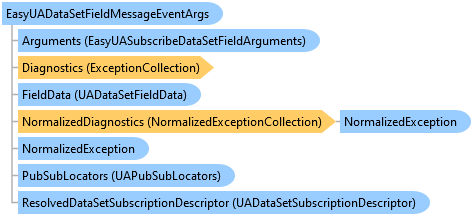
System.Object
System.EventArgs
OpcLabs.BaseLib.OperationModel.OperationEventArgs
OpcLabs.EasyOpc.UA.PubSub.OperationModel.EasyUAPubSubMessageEventArgs
OpcLabs.EasyOpc.UA.PubSub.OperationModel.EasyUADataSetFieldMessageEventArgs